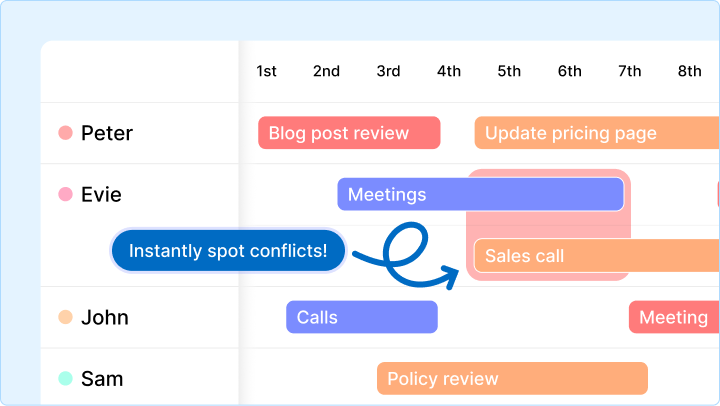
Work rarely gets messy because there is “too much to do.”
It gets messy because, at a certain size, work stops being visible.
At 5 people, you can keep most things in your head.
At 10, you can still get away with Slack, spreadsheets, and a few heroic managers.
At 20+, that breaks.
Not all at once.
But fast enough to feel like the team has suddenly become harder to run.
Tasks get missed.
Updates get chased.
The same people keep becoming bottlenecks.
Meetings multiply.
And nobody is fully confident the plan on screen matches the reality of the week.
That is the moment growing teams stop needing “better task tracking” and start needing operational visibility.
Why 20+ people is usually the breaking point
Twenty is not a magic number.
Some teams hit this wall at 12.
Some hit it at 30.
But for many growing businesses, somewhere around 20 people is where work starts crossing enough functions, projects, and priorities that the old ways stop holding.
Why?
Because complexity compounds.
You are no longer managing one stream of work.
You are managing:
- Multiple projects at once
- Shared people across those projects
- Handoffs between teams
- Shifting priorities from customers, leadership, and operations
- Status updates spread across tools, chats, and meetings
The work did not suddenly get worse.
The system just stopped making reality easy to see.
What actually makes work feel messy
Mess is not random.
It usually comes from three predictable failures.
1. Hidden handoffs
A lot of growing teams think they have a task problem.
In reality, they have a handoff problem.
Marketing is waiting on design.
Design is waiting on approval.
Operations is waiting on data.
Customer success is waiting on product.
The work exists.
The dependency exists.
But the gap between them is invisible.
That is where delays breed.
If a handoff only lives in someone’s head, a Slack thread, or a meeting note, it is not a system.
It is a risk.
2. Overloaded people hiding inside “healthy” plans
This is where delivery leaders get caught.
Each project looks fine on its own.
Each board looks under control.
Each manager says their timeline is realistic.
But the same people are quietly loaded across all of them.
That is why we described the Multi-Project Blindspot in our recent post on why project plans fail without global visibility.
The issue is not the project plan.
It is the fact that one person is carrying the pressure of three plans at once.
When that happens, the business starts missing dates for reasons the project view can never explain.
3. Disconnected views of the same reality
This is the operational tax most teams do not notice until it becomes normal.
One system shows tasks.
Another shows timelines.
Another shows reporting.
Another shows notes.
Then Slack becomes the glue holding it all together.
Now every update has to be translated.
Leaders ask:
- What is actually in progress?
- What is late?
- Who has capacity?
- What is blocked?
- What changed this week?
And the answer depends on which tool, which person, and which meeting you ask.
That is not visibility.
That is interpretation.
What growing teams actually need
They do not need more admin.
They do not need a bigger spreadsheet.
They do not need another weekly status ritual designed to compensate for poor visibility.
They need a system that makes live operational reality obvious.
That system should show five things clearly:
1. Ownership
Every important piece of work needs a visible owner.
Not a department.
Not a vague team.
A real person.
2. Sequence
Teams need to see what depends on what.
Otherwise “almost done” work keeps colliding with unfinished prerequisites.
3. Capacity
You need to know who is available, who is overloaded, and where work is stacked in ways that will break delivery.
4. Status
Not polished status updates.
Not end-of-week storytelling.
Live status.
What is moving, what is blocked, and what is slipping.
5. Shared context
If the reason behind the work lives somewhere else, the team slows down.
People should be able to move from task to detail without hunting across disconnected tools.
This is not another report to configure.
It is a live operating layer for the team.
What this looks like in Gridfox
In practice, operational visibility is not one screen.
It is one connected system with different views of the same work.
That is the key difference.
You are not rebuilding updates in different tools.
You are looking at the same reality from the angle you need.
Table View gives you the source of truth
This is where work is structured cleanly.
Owners, statuses, dates, priorities, linked records, notes.
The data is not trapped in a document or hidden in a chat.
It is operational.
Board View shows flow
When teams need to review movement through stages, Board View makes drag-and-drop progress obvious.
This is useful when your question is:
Where is work getting stuck?
Gantt View shows sequence and timing
If your risk is timing, dependencies, or unrealistic schedules, Gantt View exposes it quickly.
You can see whether the order of work makes sense, not just whether tasks exist.
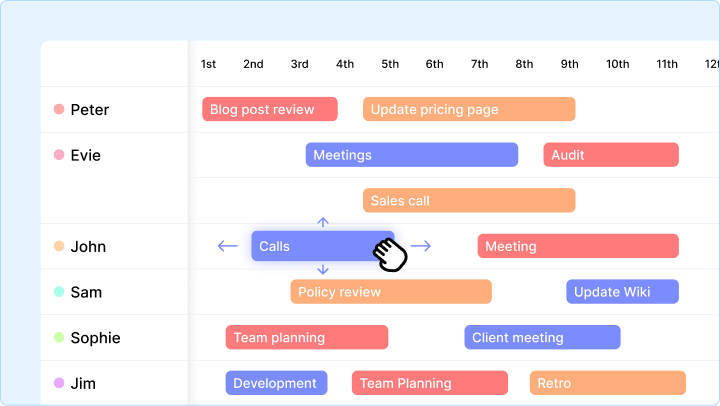
Timeline View shows people and capacity
This is where growing teams regain control.
The Gridfox Timeline shows work across people, not just inside projects.
That means you can finally see:
- Where the same person is double-booked
- Where urgent work can realistically land
- Where deadlines are being protected by hope rather than capacity
Dashboards and Pivot Views show patterns
Leaders do not just need task detail.
They need operational signals.
Where are delays increasing?
Which teams are overloaded?
What kind of work is piling up?
Dashboards and Pivot Views help teams move beyond anecdotal updates into live patterns they can act on.
A simple operating rhythm for a growing team
The system matters.
But so does the rhythm around it.
Here is a simple weekly pattern that works well for growing teams:
1. Start with active work
Open the live work list or board.
Review what is in progress, what is blocked, and what must move this week.
2. Check capacity before adding more
Open Timeline View and look for stacked work, empty space, and obvious overload.
If the same people are carrying every urgent item, you do not have a prioritisation system.
You have a burnout system.
3. Review sequencing risk
Open Gantt where timing matters.
Check whether dependencies and dates still reflect reality.
4. Review patterns, not just anecdotes
Use Dashboards or Pivot Views to spot repeat problems.
If the same stage keeps clogging, or the same function keeps becoming a bottleneck, the issue is structural.
Treat it that way.
The shift growing teams have to make
Smaller teams can run on energy, memory, and constant conversation.
Growing teams cannot.
At a certain point, success depends on whether the business can see itself clearly.
That means moving from:
- Tracking tasks to managing handoffs
- Reviewing projects to managing capacity
- Chasing updates to reading live signals
- Isolated tools to one connected operational system
This is where growing teams either become more controlled or more chaotic.
The difference is visibility.
Ready to make work feel manageable again?
If your team is growing and delivery feels harder than it should, the answer is rarely “work harder.”
Usually, the real issue is that your system no longer shows the truth clearly enough.
Gridfox helps teams bring projects, people, schedules, and reporting into one connected operational view, so decisions are based on reality instead of guesswork.
If you want to see what that looks like in practice, book a free Gridfox walkthrough and we will show you how to make your workload visible again.


 GRIDFOX