In our last post, we unpacked the Multi-Project Blindspot - the silent killer of delivery timelines caused by managing work in isolated project boards.
Today, we fix it.
This guide shows you how high-performing teams use the Gridfox Global Timeline View to expose workload risks instantly, prevent double-bookings, and make smarter scheduling decisions in seconds.
This is not another report to configure.
It is a live operational view of reality.
And once you use it, you will never go back to juggling task lists again.
👉 If you want to see this in action on your own data, you can book a free Gridfox demo here.
Step 1: Open the Global Timeline (Your Single Source of Truth)
Unlike Gantt charts or project-level views, the Timeline View lives at the top level of Gridfox.
To access it:
- Go to the top navigation bar on your Gridfox home screen
- Click Timeline
That is it.
You now see every task across all projects you have access to on one unified schedule.
No more blind spots.
No more switching between boards.
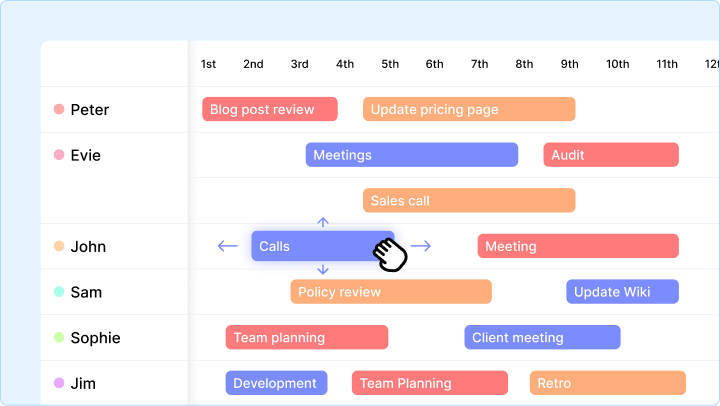
Step 2: Read the Timeline Like a Resource Leader (Rows = People)
This layout will feel familiar if you have used modern scheduling or planning tools before - and for good reason.
It is the clearest way to understand real workload.
- Vertical axis (left): Your team members
- Horizontal axis (top): Time (days and weeks)
Instead of organising work by project alone, the Timeline organises it by capacity and availability.
This shifts planning from “What tasks exist?” to the far more important question:
Who is actually free to do the work?
When you plan around people first, delivery becomes predictable instead of reactive.
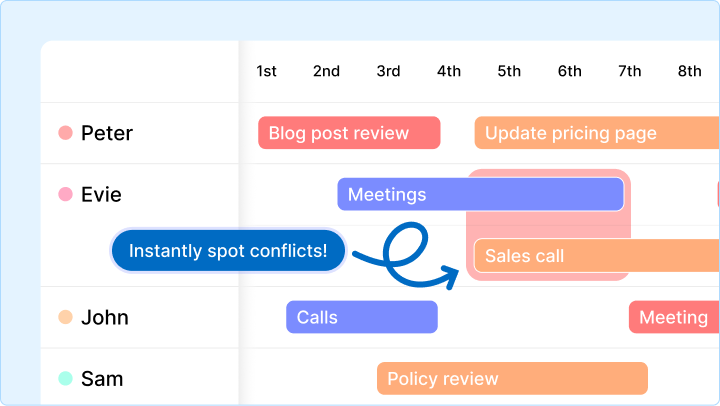
Step 3: Spot Scheduling Conflicts Instantly (The Stack Effect)
This is the visual signal that replaces endless spreadsheets.
- Each task appears as a horizontal bar on a person’s row
- When someone is booked on overlapping tasks, the bars stack vertically
And the meaning is immediate:
- One bar: Focused work
- Two stacked bars: Conflict forming
- Three or more stacks: Delivery risk
If a row looks like Tetris, you have a problem.
No reports.
No calculations.
Just visual truth.
This is why leading teams use Gridfox as their staff scheduling software, not just a task tracker.
Step 4: Respect Reality with Working Hours (The Grey Zones)
Most tools assume people work 24/7.
Gridfox does not.
The Timeline automatically reflects:
- Working hours
- Weekends
- Public holidays
You will see:
- White space: Actual working time
- Grey zones: Non-working hours
If a task stretches across grey zones, its duration is misleading.
Example:
A “three-day” task booked over a bank holiday weekend is not three working days.
The Timeline makes impossible schedules visually obvious before they become missed deadlines.
Step 5: Cut Through the Noise with Smart Filters
Large teams? Busy timelines?
No problem.
Use the filter bar to focus instantly:
- Filter by project
- Filter by team member
- Filter by task status
Pro tip:
Filter to show only In Progress work to see exactly what is consuming capacity right now.
This is how resource managers think in real time.
Step 6: Fix Conflicts Without Leaving the Screen
Seeing problems is only useful if you can act quickly.
On the Timeline you can:
- Drag tasks left or right to reschedule
- Extend or shorten durations
- Reassign work by dragging between team members
All without opening a single task.
(We will cover advanced firefighting workflows in the next post.)
Why the Timeline Changes How Teams Deliver
The Gridfox Timeline becomes your daily operational command centre.
Every morning:
- Scan for stacked tasks (conflicts)
- Check grey zone overlaps (false timelines)
- Spot white space (real availability)
This is how teams move from reactive chaos to proactive control.
Ready to See This on Your Own Projects?
Most teams spot scheduling issues within minutes of opening the Timeline for the first time.
You can do the same.
👉 Book a free Gridfox demo and walkthrough
Next up:
3 Fire-Fighting Moves You Can Do Directly from the Timeline to resolve conflicts before they derail delivery.


 GRIDFOX