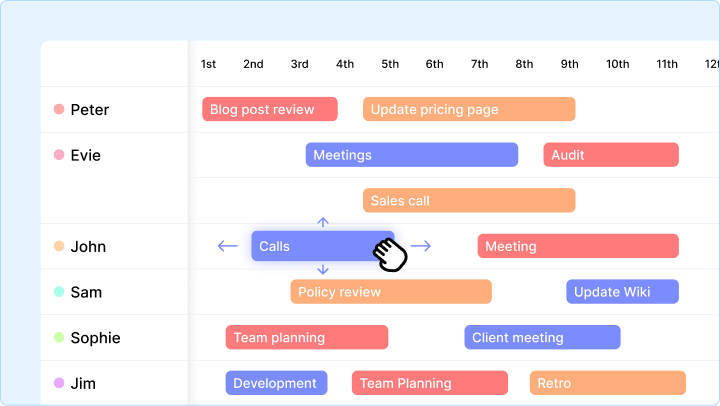
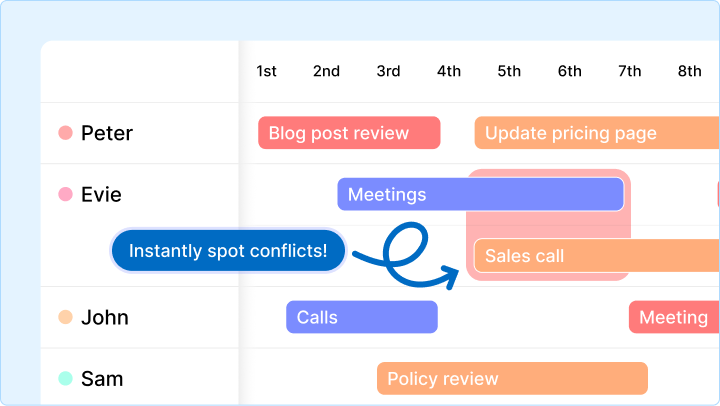
In the last post, we looked at how to spot scheduling conflicts instantly using the Gridfox Timeline - those stacked task bars that reveal overload in seconds.
But visibility alone does not protect delivery.
High-performing teams don’t just observe problems.
They correct them in real time.
The Gridfox Timeline is not a static report. It is a live operational control panel. When priorities shift, people are off sick, or work runs late (which it always does), these three “fire-fighting” moves let you rebalance workload in seconds - without opening a single task.
And once you start using them, scheduling stops being a daily crisis.
Move #1: The Sick Day Swap (Instant Reassignment)
The scenario
It’s 9:00am. Steve calls in sick.
You open the Timeline and see a critical task assigned to him that is due today.
The client is waiting.
The old way
- Open the project
- Search for the task
- Open the record
- Click edit
- Change assignee
- Save
The Timeline move
- Find Steve’s row
- Click the task bar
- Drag it down to Sarah’s row
The result
The task is instantly reassigned.
Sarah is notified.
Steve is removed.
The schedule stays intact.
This is real-time resource management in one motion.
Pro tip: Look for white space on other rows before dropping the task. That is where real capacity exists.
Move #2: The Reality Check (Rescheduling Without the Spreadsheet)
The scenario
A task was meant to take two days.
It is now day three and still running.
Because of this delay, tomorrow’s work is now stacked on top of it - creating a conflict.
The old way
Slack messages.
Calendar edits.
Spreadsheet updates.
And still confusion.
The Timeline move
- Extend the task: Drag the right edge of the bar to reflect the real finish date
- Shift the conflict: Drag the next task to the right into available time
The result
Gridfox automatically updates:
- Start dates
- End dates
- Durations
The schedule now reflects reality.
No double-booking.
No false deadlines.
No broken promises.
This is how teams keep delivery predictable even when plans change.
Move #3: The Quick Clear-Out (Instant Status Updates)
The scenario
Your Timeline is cluttered with tasks from last week that are clearly finished - but still marked as active.
The view becomes noisy.
Conflicts become harder to spot.
The old way
Chasing updates.
Sending reminders.
Waiting.
The Timeline move
- Right-click the task bar
- Select Complete (or your equivalent status)
The result
The task updates instantly.
If your filters hide completed work, it disappears from view, leaving only live priorities on screen.
Clean timeline.
Clear focus.
Better decisions.
Bonus: Instant Context Without Leaving the Timeline
Sometimes you see a task like “Update homepage” and have no idea:
- Which project it belongs to
- What the scope is
- Why it was scheduled there
You don’t need to switch views.
- Hover to preview key details
- Double-click to open the full task in a modal
You can review requirements, add a comment like “Moving due to delay”, and close it without losing your place.
Speed matters when managing capacity.
From Watching Problems to Controlling Delivery
Most teams manage schedules reactively.
The Gridfox Timeline lets you operate proactively:
- Spot overload instantly
- Rebalance work in seconds
- Keep delivery aligned with reality
This is what modern project resource management looks like.
If you have not used the Timeline yet, click Timeline in your top navigation and see what your team’s workload actually looks like.
And if you want to experience this on your own projects:
👉 Book a free Gridfox demo and walkthrough
Teams usually uncover hidden conflicts within minutes.
Need help setting working hours or holidays?
Visit our help centre at https://gridfox.com/help or reach out to the Gridfox team anytime.



 GRIDFOX