A process rarely breaks all at once.
It usually starts with one extra approval. One new team involved. One extra field somebody needs for reporting. One handoff that now needs tracking properly instead of “just drop it in Slack”. Then another. Then another.
Before long, the system that once felt tidy starts resisting the work.
People create side spreadsheets. They add manual checks. They keep exceptions in email. Meetings get longer because the system no longer reflects what is actually happening.
If your process has to stay still so your software can cope, the software is running the business.
That is the real issue. Not whether the team has process. Not whether the people are disciplined. The issue is whether the operational system can absorb change without turning every improvement into a workaround.
Gridfox’s current positioning leans directly into that problem: a customisable work platform with tailored workflows, dynamic views, access controls and templates that teams can adapt to their own way of working rather than forcing the process into a fixed shape.
Why this problem happens
Most systems are chosen at one stage of the business, then judged at another.
When the team is smaller, a simple setup feels efficient. One request list. One status flow. One person who knows what is going on. Fewer rules. Less governance.
Then the operation matures.
Now requests need triage. Different teams need different views. Leadership wants cleaner reporting. Finance wants extra fields. Delivery wants fewer surprises. Managers need to separate urgent work from important work. Someone eventually asks for a proper audit trail.
That is where rigid systems start to show their limits. They assume the workflow is basically fixed, when in reality a healthy operation changes as the business learns.
Gridfox’s help centre and template library both reflect the opposite model: tables can be created and extended over time, fields can be added, views can be configured by role, and workflows can be layered on as the operating model becomes more defined.
What teams usually do instead
Most teams do not replace the system straight away. They patch around it.
They create a spreadsheet to catch missing information.
They use a form outside the system because the built-in intake is too rigid.
They build a separate dashboard for leadership.
They ask people to tag updates in a chat thread.
They rely on one operations manager to “translate” the real state of work every week.
That is not a system. That is a rescue operation.
The trap is that each workaround feels reasonable on its own. Together, they create a process nobody can see cleanly and everybody experiences differently.
The Gridfox way
The strongest operational systems have two qualities at the same time:
They are structured enough to give clarity, accountability and consistency.
And they are flexible enough to change when the process changes.
That is the balance Gridfox is designed for. You can create linked tables, build different views for different roles, use forms to capture work at the point it starts, apply saved filters to separate what matters, and add workflows once the rules are clear. Permissions then control who sees what as the system grows beyond a single team.
That means your process can evolve without your operational system collapsing into exceptions.
What this looks like in Gridfox
A practical Gridfox setup for a growing operations team might include:
- a Requests table for incoming work
- a Projects table for approved initiatives
- a Tasks table linked to Projects
- a Risks table linked to Projects
- an Approvals or Stage Gates table if governance has become more formal
Those relationships matter. Gridfox supports linked data across tables, including one-to-many relationships such as one Project with many Tasks. That gives you a system that reflects the real process rather than flattening everything into one giant tracker.
From there, the team can configure:
- a Board View for requests moving through triage and approval
- a Grid View for detailed editing and admin
- a Calendar View for deadlines and review dates
- a Dashboard View for workload, risk, overdue items or status by team
Gridfox’s views are designed exactly for that kind of role-based interaction with the same underlying tables. Dashboard charts can also use saved filters, so teams can surface just the slice of work they need to track.
Step-by-step walkthrough
1. Start by modelling the real process
Do not begin with statuses. Begin with entities.
Ask:
- What enters the system?
- What gets approved?
- What gets delivered?
- What needs reporting?
- What needs restricting?
For many teams, that means separating requests, projects, tasks, risks and approvals instead of forcing everything into one table.
In Gridfox, linked tables are what let you do that while keeping the relationships intact.
2. Add fields for the decisions people actually make
A maturing process usually needs more than title, owner and due date.
Useful fields might include:
- request type
- business impact
- urgency
- department
- approval stage
- risk level
- target start date
- required budget sign-off
- sponsor
- missing information flag
Gridfox fields can be added over time, and required-field settings help tighten up record quality once the team knows what information really matters.
3. Create views for each role, not one view for everyone
This is where rigid tools often slow teams down.
The ops team may want one view for triage.
Delivery leads may want another for active work.
Leadership may only want exceptions, deadlines and capacity signals.
Gridfox supports multiple view types on top of the same table data, including grid, board, calendar and dashboards, so the system can serve different jobs without splitting the data.
4. Capture work properly at the front door
If work still starts in email or chat, the system is already behind.
Use a form to capture incoming requests with the right structure from the start. Gridfox forms create records directly in tables, work across devices, and can be embedded on existing websites. That makes them useful for internal request intake, issue submission or stakeholder updates.
5. Use saved filters before you automate anything
This is one of the most practical moves in Gridfox.
Build filters for:
- requests missing information
- items due this week
- projects at risk
- approvals waiting on finance
- tasks assigned to a particular team
Saved filters can then be reused in dashboards and workflows, which turns them into an operational control layer rather than just a convenience.
6. Add workflows once the rules are stable
Once the process is clear, automate the obvious admin.
For example:
- send a notification when a request moves to In Review
- send a weekly email with upcoming approvals
- notify a delivery lead when a record is created in a high-priority category
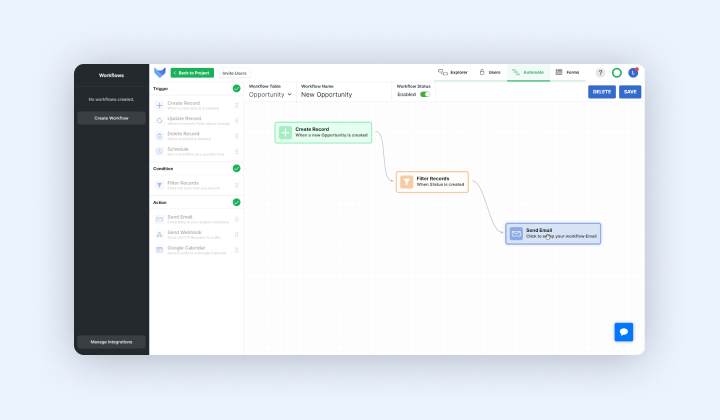
Gridfox workflows support record-based and scheduled triggers, with conditions that limit when the action runs. Scheduled workflows can run daily, weekly or monthly.
7. Tighten permissions as more people join the system
As systems mature, not everybody should see everything.
Gridfox permissions are group-based, and record access can be restricted using user fields or who created the record. That matters once finance, leadership, external contributors or departmental teams all need different levels of access.
Practical example: an operations lead scaling internal request intake
Picture an operations lead in a 70-person business.
At first, every internal request comes through a shared inbox. Small process changes are manageable because the ops lead knows the context. But as the business grows, requests start needing clearer ownership, approval stages, deadlines and trade-offs. Leadership also wants visibility into what is waiting, what is blocked and what is likely to land next month.
The old setup starts to fail not because the team is disorganised, but because the process has matured beyond a shared inbox and a spreadsheet.
In Gridfox, that ops lead could start with the Project Intake & Prioritisation template. It gives teams a structured place to capture new ideas, score them consistently, steer them through triage to approval, and tailor the fields, stages and views to their own governance process. It also supports Calendar and Board views, plus workflows for alerts when requests move into review or decision dates are approaching.
As the process evolves, the team could then:
- add a finance approval field
- create a filtered dashboard for overdue decisions
- split approved work into a linked Projects table
- add a Risks table for larger initiatives
- restrict leadership-only records through permissions
That is the key point. The system does not need replacing just because the process got more mature. It needs to be able to evolve with it.
If the team grows further, Gridfox’s Project Management Office template extends that same idea into broader governance, milestones, risks, resources, forms, dashboards and approval workflows across a portfolio.
A short checklist
When you look at your current operational system, ask:
- Can we add the fields we now need without breaking everything?
- Can different teams work from different views of the same data?
- Can we separate requests, delivery and risk properly?
- Can we automate reminders without losing control?
- Can we tighten permissions as more stakeholders get involved?
- Can the process become more structured without forcing more work outside the system?
If the answer is no to most of those, the system is probably too rigid for the stage you are entering.
Common mistake
The most common mistake is treating standardisation as if it means freezing the process.
It does not.
A strong process should become clearer over time. It should not become untouchable.
Another common mistake is automating too early. Teams sometimes add notifications and approval steps before they have agreed the basic structure. That just creates faster confusion.
And one more: rebuilding the old mess in a new tool. If everything still sits in one bloated tracker, the software may be new, but the operating model is not.
The better approach is to create a clean structure first, then let the system evolve in controlled ways: new fields where decisions need more context, new views where roles need clearer focus, new workflows where repeated admin no longer needs human effort. That is exactly the kind of layered setup Gridfox supports through configurable fields, views, workflows and permissions.
Conclusion
The best operational systems are not the most rigid.
They are not the ones with the longest feature list.
And they are not the ones that look tidy only because the process has been forced to stay simple.
They are the ones that can absorb change without losing clarity.
As your process matures, the system should help you add structure where it is needed: better intake, better handoffs, better reporting, better visibility, better control over who sees what.
That is the real test of an operational system.
Not whether it fits the process you had six months ago.
Whether it can keep supporting the process you are becoming.
Gridfox is built around that idea: structured records, flexible views, automation, linked data and permissions that let teams refine how they work without starting over every time the process gets sharper.
If your team is outgrowing shared inboxes, spreadsheets or fixed workflows, start with Gridfox’s Project Intake & Prioritisation template and tailor the fields, stages and views to match the way your process really works now.


 GRIDFOX