The software usually looks fine right up until the moment the portfolio grows.
One more building. A few more units. A few more contractors. A few more compliance deadlines. Then suddenly the cracks show. The team cannot track work the way they actually run it. Maintenance lives in one place. Compliance lives somewhere else. Resident details sit in another system. Notes land in email. Urgent jobs get chased on the phone because nobody trusts the system to show the real picture.
Rigid software does not remove complexity. It just pushes it somewhere messier.
That is the point where growing property teams start feeling the drag. Not because they lack process. Because the tool they chose assumes every portfolio should work the same way.
Gridfox’s own Property Management template is built around the fact that real property operations span properties, units, residents, compliance tests, maintenance, documents and resource allocation, and that the structure needs to follow the way the portfolio actually operates.
Why this problem happens
Most rigid systems break for a simple reason: they force a fixed model onto a changing operation.
A growing property team rarely works in one flat layer. It works in relationships:
- a portfolio contains properties
- a property contains units
- a unit may have a resident, tenancy or issue attached
- a compliance check belongs to a specific property or unit
- a work order may involve a contractor, a due date, a status, a cost and supporting documents
That is not awkward edge-case data. That is the job.
Gridfox supports linked tables and both one-to-many and many-to-many relationships, which is exactly the kind of structure property operations need when the data stops being flat.
Rigid software tends to fail when one of these things happens:
- your team needs a new field the product did not expect
- one site has a different process from another
- compliance needs to be tracked by different frequencies or asset types
- contractors need limited access without seeing everything else
- management wants one portfolio-level view while site teams need detail at unit level
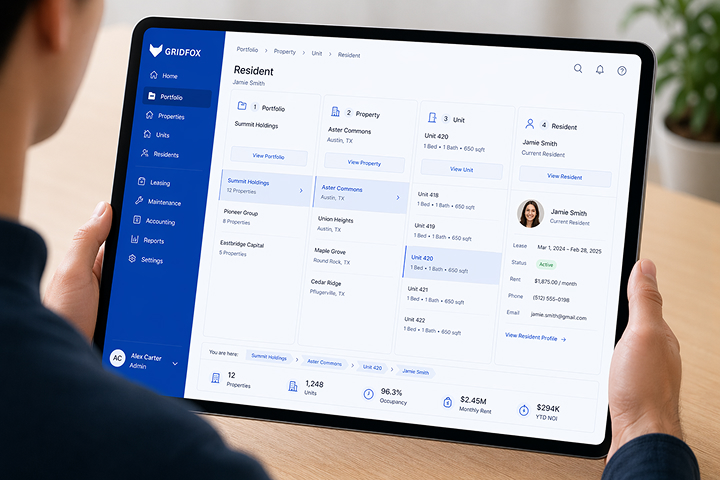
Gridfox’s property setup leans into those pressures: flexible schemas, drill-downs from portfolio to property to unit to resident, multiple views, automations, forms and granular permissions.
What teams usually do instead
They patch around the software.
They keep the rigid system because “it handles the basics”, then build an unofficial operating layer around it:
- a spreadsheet for compliance dates
- a shared inbox for maintenance
- a separate tracker for contractors
- a weekly meeting just to reconcile status
- a manager who knows the real state of things from memory
That works for a while. Then the team grows, people change, and the memory layer disappears.
The usual mistake is thinking the answer is either “stay in the rigid tool” or “rip everything out and buy a huge enterprise system”. There is a better middle ground: keep the structure strong, but make the workflow adaptable.
The Gridfox way
Gridfox is useful here because it does not make you choose between a blank spreadsheet and a locked-down system.
You can start from a template, create projects from scratch, add tables and fields as needed, then layer on views, saved filters, workflows and permissions that match how your team already works. Gridfox also has a Property Management template designed to track tenants, payment statuses and reported issues, with a board to show issue stages.
What this looks like in Gridfox
For a growing property team, that often means building a setup like this:
- Properties table for blocks, buildings or houses
- Units table linked to Properties
- Residents or Tenancies table linked to Units
- Compliance Checks table linked to either Properties or Units
- Work Orders table linked to Properties, Units and Contractors
- Contractors table for supplier records, contact info and trade type
Gridfox’s relationship model is designed for this kind of setup, and its property workflow is built around custom data structures, drill-down views and purpose-built property interfaces.
That gives you one operational system instead of five disconnected trackers.
Step-by-step walkthrough
1. Start with the structure, not the screen
Create the core tables first:
- Properties
- Units
- Residents or Tenancies
- Compliance Checks
- Work Orders
- Contractors
Then link them properly.
For example:
- each Unit links to one Property
- each Resident/Tenancy links to one Unit
- each Work Order links to a Property, optionally a Unit, and a Contractor
- each Compliance Check links to the asset it belongs to
In Gridfox, tables can be created at any time, new fields can be added as the process evolves, and relationships can be set up as one-to-many or many-to-many depending on the workflow.
2. Add fields that match the real job
Do not stop at “address” and “status”.
For Compliance Checks, useful fields might include:
- Check Type
- Asset / Unit
- Due Date
- Last Completed Date
- Status
- Assigned To
- Certificate File
- Priority
For Work Orders:
- Job Title
- Property
- Unit
- Reported By
- Trade
- Contractor
- SLA Due Date
- Status
- Cost Estimate
- Completed Date
Gridfox lets you set required fields, make fields default to today’s date, and default user fields to the currently signed-in user, which is useful when you want cleaner record creation without manual re-entry.
3. Build views for the way each person works
This is where rigid tools often fall down. Everyone gets stuck looking at the same screen.
In Gridfox, you can layer different views over the same data:
- Grid View for detailed record management
- Board View for maintenance stages like New, Booked, In Progress, Waiting on Parts, Complete
- Calendar View for inspections, renewals and due dates
- Dashboard View for overdue checks, open work orders and workload by contractor
- Timeline if you need a cross-project view of who is overloaded and what is colliding
Gridfox supports all of those view types, and you can create multiple views on the same table so different teams see the same records in the format that helps them act.
4. Add saved filters before you add automations
A lot of teams automate too early and end up spamming people.
First create filters like:
- Gas checks due in 30 days
- Electrical tests overdue
- Open work orders older than 7 days
- Jobs assigned to Contractor A
- High-priority issues in Block C
In Gridfox, saved filters sit in the left-hand navigation and can also be reused in dashboard charts and workflows. That makes them a practical control layer, not just a nice extra.
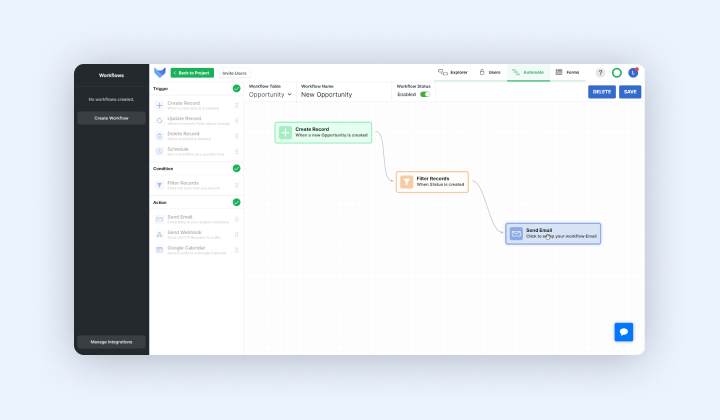
5. Use workflows to chase risk automatically
Once the filters are right, add workflows.
A simple property operations setup could include:
- a scheduled workflow every Monday morning that emails the compliance owner all checks due in the next 30 days
- an update-record workflow that alerts the property manager when a work order changes to Blocked
- a create-record workflow that notifies the team when a new issue is submitted
Gridfox workflows support create, update, delete and scheduled triggers, and scheduled workflows can run daily, weekly or monthly. Email workflow steps can also include a table of the matching records, including linked parent data where relevant.
If residents, site teams or contractors are reporting issues, do not make them email a generic inbox.
Use a form that creates a new Work Order record with the right fields from the start. Gridfox forms create records directly in tables, work across devices, and can be embedded on existing websites. Gridfox’s property workflow also calls out forms specifically for maintenance, inspections and tenant information capture.
7. Lock down visibility without blocking the work
Growing property teams usually need different access levels for site staff, managers, finance, contractors and external stakeholders.
In Gridfox, permissions are managed by groups, and you can control table-level access, field-level access, and even which records users can view or edit based on a user field. That means a contractor can work inside Work Orders without seeing resident-sensitive data, while internal managers keep the full picture.
Practical example: an ops lead managing five sites
Imagine an operations lead managing five residential blocks with a small internal team and a handful of external contractors.
Their actual problem is not “we need better task management”.
It is closer to this:
- fire door checks are due at different frequencies
- one site has more reactive maintenance than the others
- contractors need updates without seeing resident information
- managers want a weekly portfolio view
- site teams only care about what is due now
A rigid system usually handles one slice of that well and forces the rest into workarounds.
In Gridfox, that ops lead could:
- use the Property Management template as a starting point
- keep a linked Properties -> Units -> Residents/Tenancies structure
- run a Board View for maintenance jobs by stage
- run a Calendar View for compliance due dates
- create a Dashboard for overdue tests and ageing work orders
- use Saved Filters for each site or compliance type
- set a weekly scheduled workflow for upcoming risk items
- apply group permissions so contractors only see the work they need
That is a workflow built around the portfolio, not around the limitations of the software.
A short setup checklist
If you are fixing this problem, start here:
- Define the real entities first: properties, units, residents, compliance, work orders
- Link them properly instead of stuffing everything into one table
- Create views for each job, not one view for everyone
- Save filters for due, overdue and site-specific work
- Automate reminders only after the filters are trustworthy
- Restrict access by role before inviting wider users
- Add forms anywhere work currently starts in email
Common mistake
The most common mistake is importing the old mess into a new system without changing the structure.
Teams leave a rigid tool because it cannot flex, then recreate the same problem by building one giant catch-all table called “Property Tracker”.
That usually gives you the worst of both worlds: the software is newer, but the operating model is still flat.
The better move is to separate the entities properly, then connect them.
Another common mistake is making maintenance the centre of the whole system. Maintenance matters, but for most growing property teams it is only one part of the operation. If compliance, occupancy, documents and site workload still sit outside the system, you have not really solved the operational problem.
And if you manage void turnarounds or planned works, you can go a step further: create a task table with a self-referencing relationship so one task can depend on another, then surface that in a Gantt view. Gridfox supports self-referencing dependencies in Gantt, which is useful when, for example, decorating cannot start until inspection or sign-off is complete.
Conclusion
Growing property teams do not need software that is “simple” because it leaves things out.
They need software that can stay structured while the operation gets more complex.
That is why rigid systems fail. They assume the workflow is fixed. Property operations are not.
Teams add buildings, units, contractors, compliance schedules, reporting needs and handoffs. The system either adapts with them or becomes another thing they have to manage.
Gridfox is a better fit when you need to model the real structure of the portfolio, choose the views that match the work, automate the obvious admin, and keep the right people looking at the right data. That is the difference between software you tolerate and software you can actually grow on.
If your team is outgrowing shared inboxes, spreadsheets or fixed workflows, let’s jump on a call and tailor the fields, stages and views to match the way your process really works now.
Book a free consultation call.


 GRIDFOX