The inspection is booked. The contractor’s insurance document is awaiting review. The property manager has a reminder for the existing certificate, but the person arranging access has not seen it.
Each date is being tracked. The work still has a gap.
For property teams, the hard part of property compliance tracking is rarely recording the date. It is connecting the things a deadline depends on: the right property or unit, an available contractor, access arrangements, evidence and someone responsible for checking the result.
Our earlier article on growing property teams explored the wider need for flexible systems. Here we will focus on one working question: what has to happen before a property check or contractor renewal can be considered complete?
Keep property checks and contractor evidence distinct
These records are related, but they answer different questions.
A property check concerns a particular building, unit or asset. A contractor evidence record concerns a supplier and a particular document or requirement. A work order connects the planned activity to the people arranging and carrying it out.
Combining everything into one “Expiry dates” table makes it difficult to see which requirement a document supports or what action is still missing.
For a fictional property pilot at Alder Services, start with these records:
| Table |
What it tracks |
| Properties and Units |
The location the work concerns |
| Organisations |
Contractors and other suppliers, reusing the shared records |
| Property Checks |
Each required check, its owner, due date and current stage |
| Contractor Evidence |
A specific supplier document, its review and any relevant expiry |
| Work Orders |
The job, assigned contractor, booking and access arrangements |
Link each check and work order to the relevant property or unit. Link contractor evidence to the supplier organisation. Link a work order to the check it is intended to fulfil where that relationship is useful.
This extends the connected records approach from earlier in the series without duplicating contractors for each building.
Track the next action beside each date
Suppose a check at the fictional Bridge House is due on 15 February 2027. The team has agreed an earlier internal date to arrange the work, and a contractor document needs review before the booking is confirmed.
The property-check record needs an owner, due date, stage, next action and next-action deadline. Its stages might be To arrange, Booked, Awaiting evidence, Follow-up required and Complete.
The contractor-evidence record needs a document type, supplier, file, review owner, review status and expiry date where applicable. Record what has been reviewed and what requirement it supports. A single supplier-level “Valid” checkbox can conceal differences between documents and types of work.
Set check requirements and frequencies from the applicable obligations and responsible specialist review. Different properties, assets and activities can need different treatment. A reminder system should use those checked requirements as inputs.
Make readiness visible before the visit
Booking a contractor is one step. The person coordinating the job also needs to know whether access is arranged and whether the relevant supplier evidence has been checked.
Capture those items on the work order or its linked records. If the team needs a summary readiness stage, define who checks it and who updates it. Start with a deliberate coordinator review before adding automation.
For Bridge House, the weekly review should reveal that the visit is planned but the contractor document remains unresolved. The owner can then chase the missing item or revise the booking while there is still time to act.
The important connection is between the outstanding requirement and the job it affects. A separate email reminder about a document may not make that consequence visible.
Build views around unresolved work
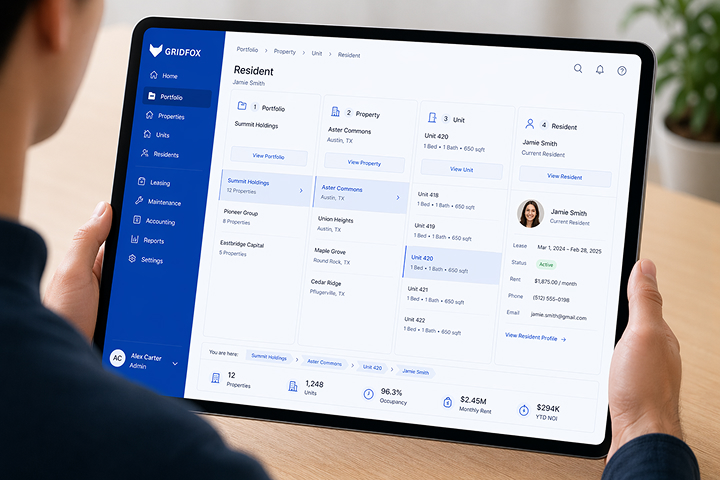
In Gridfox, use a detailed grid for checking records and saved filters for recurring review questions:
- Which open property checks are approaching their due dates?
- Which checks are booked but still have an unresolved preparation action?
- Which visits have taken place but are awaiting evidence review?
- Which contractor documents need review or replacement?
- Which follow-up actions are overdue or have no owner?
A Calendar View can show planned visits. A Board View can show the check stages. Use the grid to retain the detail behind those summaries, especially the next action and the person responsible.
Choose date windows based on the team’s lead times. Test the filters against sample records at the boundary dates so a deadline does not disappear from review at the wrong moment.
Send reminders to the person who can act
Once the filters are reliable, create scheduled internal reminders for the relevant owners. A property-check reminder might include the property, check type, due date, stage and next action. A contractor-evidence reminder can go to the internal supplier owner who obtains and checks documents.
Gridfox’s email workflows can include matching records and collate scheduled results by recipient. Give each reminder a clear purpose so recipients know what needs their attention.
If a contractor uses a public form to send information, route the submission through an intake table for internal review and linking. Gridfox public forms create new records; the intake still needs checking against the right contractor and requirement.
For contractors who have project access, configure permissions around the records and fields they need. Test that access with a contractor role before inviting people into a live portfolio.
Close the check after reviewing the result
A file upload shows that a document has arrived. It does not establish that the check passed or that any resulting actions have been completed.
Have the responsible person review the evidence, record the outcome and create or link follow-up work where needed. Keep the completed record and its evidence when setting up the next check so the previous result remains available.
Contractor renewals need the same discipline: record the review outcome and complete any required follow-up before treating the item as resolved.
Begin with one property and a small set of checks and suppliers. Run the weekly review from those records, then expand once the team can see the deadlines, dependencies and outstanding actions together.
Discuss a property deadline workflow with Gridfox. Bring one anonymised check and the contractor steps around it so we can map the process from planning to reviewed evidence.



 GRIDFOX