It’s 2026. Project management has evolved, but one tool remains a staple of high-performing teams: the RAG rating template.
Think of it as the traffic light for your project’s health. Red means stop, a critical issue requires intervention; Amber is a warning that variables are slipping; and Green signals that you are on track to deliver. Simple, right?
However, in an era of AI-driven analytics and hybrid teams, simply “slapping colours on a report” doesn’t cut it anymore. You need to set it up right, automate where possible, and ensure your team understands the psychology behind the status. Let’s dive into how you can make the most of this tool and steer your projects to success in the modern landscape.
Key Takeaways
- Standardisation: Clear criteria for Red, Amber, and Green prevent subjective reporting.
- Automation: Modern tools (like Gridfox) can automate RAG status based on data, removing human bias.
- Psychology: Understanding “Watermelon Reporting” is key to accurate data.
- Customisation: Adapting the template to include statuses like “Blue” (Completed) for agile workflows.
- Action: RAG ratings are useless without a “Road to Green” action plan.
Understanding the RAG Rating Template
What is a RAG Rating?
RAG ratings - Red, Amber, Green - are a visual shorthand used to communicate the status of a project, task, or risk.
- 🔴 Red: Critical issues. The project is off track, and the deadline or budget is in jeopardy. Immediate executive intervention is often required.
- 🟠 Amber: Warning signs. There is a deviation from the plan (e.g., a 5% budget overspend), but the team has a plan to recover without external help.
- 🟢 Green: On track. The project is proceeding according to plan.
New for 2026: The “Blue” Status
In modern agile and hybrid frameworks, many teams have adopted a Blue status.
- 🔵 Blue: Complete. The deliverable has been finalized and signed off. This helps distinguish active “Green” tasks from finished work.
Why It Matters More Than Ever
In the data-heavy environment of 2026, executives don’t have time to parse through 50-page reports. They need a dashboard. RAG ratings provide that “at a glance” capability. They allow stakeholders to practice management by exception - ignoring the Green, monitoring the Amber, and swarming the Red to solve problems.
Setting Up Your RAG Rating Template
Defining Your Logic (The “Copy/Paste” Rules)
The biggest failure point in RAG reporting is subjectivity. One project manager’s “Amber” is another’s “Red.” To fix this, you need hard logic.
Here is a standard criteria set you can copy for your template:
| Status |
Timeline Logic |
Budget Logic |
Risk Level |
| Green |
On schedule |
On or under budget |
Risks managed |
| Amber |
< 10% deviation |
< 5% overspend |
Mitigation plan active |
| Red |
> 10% deviation |
> 5% overspend |
Issue realized/No plan |
Moving Beyond Manual Entry: Automated RAG Logic
If you are manually coloring cells in a spreadsheet, you are working in the past. Modern platforms allow for Automated RAG Reporting.
Using a tool like Gridfox, you can set simple rules. For example:
- If [Due Date] < Today AND [Status] != “Complete”, automatically set RAG to Red.
This removes the hesitation a Project Manager might feel about reporting bad news. The data speaks for itself.
Pro Tip: Customising your template isn’t just about colours; it’s about aligning the logic with your risk appetite. If you are working on a high-stakes compliance project, your tolerance for “Amber” might be much lower.
The Psychology of RAG: Avoiding the “Watermelon Effect”
What is Watermelon Reporting?
One of the most dangerous trends in project management is the “Watermelon Project.”
It looks Green on the outside (in the report), but it is deep Red on the inside (in reality).
This happens when the RAG criteria aren’t clear, or worse, when there is a culture of fear around reporting “Red” statuses. If a Project Manager feels they will be punished for a Red status, they will artificially keep it Green until it is too late to fix.
Creating a “Road to Green” Culture
To ensure your RAG template is effective, you must separate the status from the person.
- Red is not a failure. Red is a request for help.
- Amber is not bad. Amber is a trigger for increased monitoring.
Encourage your team to report honestly by asking for a “Road to Green” plan whenever a non-green status is reported. This shifts the focus from “Who is to blame?” to “How do we fix this?”
Integrating RAG Ratings into Decision Making
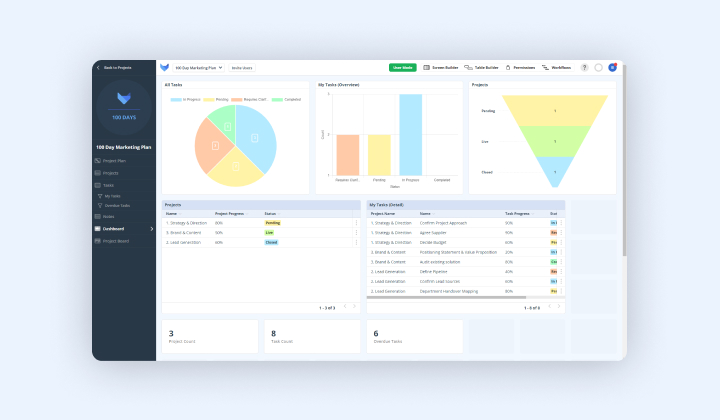
The RAG Dashboard
Your template should feed into a central dashboard. When presenting to stakeholders, use the RAG status to drive the meeting agenda.
- Don’t discuss Green items: If it’s Green, acknowledge it and move on.
- Focus on Red: Spend 80% of your meeting time here. What resources are needed? What scope needs to be cut?
- Review Amber: Spend 20% of your time here to ensure the recovery plan is solid.
You need a tool that supports this visualization. GRIDFOX’s project management templates are designed to handle this natively. They allow you to:
- Input task data.
- Apply RAG logic automatically.
- Generate visual dashboards for stakeholders instantly.
The Future of RAG: Predictive Analytics
As we look toward the latter half of the 2020s, RAG ratings are shifting from descriptive (what happened) to predictive (what will happen).
AI-Driven RAG Status
Emerging tools are now using AI to analyze project communication and velocity. Even if a project is marked Green, the system might flag a “Predicted Amber” based on the fact that communication has slowed down or ticket completion rates have dropped.
This Predictive RAG allows Project Managers to intervene weeks before a deadline is actually missed.
Conclusion
Using a RAG rating template is about more than just colourful charts. It is about transparency, automation, and action.
By establishing clear criteria, automating the reporting process where possible, and fostering a culture where “Red” is seen as an opportunity to course-correct rather than a failure, you turn a simple reporting tool into a strategic asset.
Don’t let your project reports become watermelons. Be clear, be honest, and use the tools available to keep your projects truly Green.
Frequently Asked Questions
What does RAG stand for?
RAG stands for Red, Amber, Green. It is a traffic-light system used to visually represent the status of a project or task. In 2026, many teams also use Blue for “Complete.”
What is the “Watermelon Effect” in RAG reporting?
This refers to a project that appears Green (healthy) in reports but is actually Red (failing) in reality. It usually occurs when teams are afraid to report bad news.
Can I automate my RAG ratings?
Yes. Using no-code tools like Gridfox, you can set logic rules (e.g., based on budget or timeline data) that automatically assign the correct RAG colour, reducing human error and bias.
How do I define “Amber”?
Amber generally means there is a problem, but it can be handled by the project team without escalating to senior management. For example, a 5% budget overspend that can be covered by a contingency fund.
Is Red always bad?
No. A Red status simply means the project requires attention or external support to get back on track. Identifying a Red status early is actually a success, as it allows time for correction.


![Mastering the RAG Rating Template for Project Success [2026]](/blog-assets/how-to-effectively-use-a-rag-rating-template-for-project-management-success-2026.jpg)
 GRIDFOX