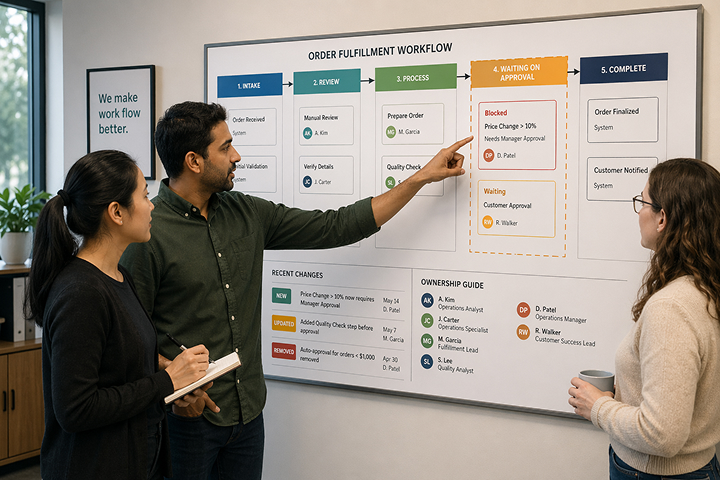
The spreadsheet contains more than data.
Its colours show which contracts are urgent. A comment explains an exception. A hidden tab feeds the weekly report. One colleague knows why a formula must never be changed, and another keeps a separate copy for the review meeting.
Uploading the rows will move only part of that process.
A good spreadsheet migration turns the team’s working knowledge into records, relationships, ownership and rules that colleagues can understand. The aim is not to copy the workbook. It is to move one process into a system the team can run with confidence.
1. Choose a process with a clear boundary
Start with a process you can describe from beginning to end: contract renewal, maintenance requests or supplier onboarding, for example.
For the fictional Alder Services team used throughout this series, the first migration covers active supplier contracts and their next renewal reviews. It leaves historic procurement analysis and unrelated finance spreadsheets for a later phase.
Write down what success means in working terms. For this migration, a colleague should be able to find an agreement, identify its owner, see its checked deadlines and record the next action. An operations manager should be able to review outstanding decisions without combining several files.
That definition keeps the project focused when requests for extra fields and reports arrive.
2. Find the process hidden in the workbook
Review the spreadsheet with the people who use it. Ask them to explain colours, comments, formulas, hidden tabs and the changes made before each meeting.
Turn meaningful conventions into explicit information:
| Spreadsheet convention |
Possible system design |
| Red fill means an unresolved deadline |
A deadline field, stage and exception filter |
| Initials in a cell identify the owner |
A User field linked to a project user |
| A separate worksheet exists for each supplier |
Organisation records linked to contracts |
| A comment records a renewal decision |
Decision and rationale fields |
| A copied worksheet provides next month’s review |
A maintained view over the current records |
Some conventions can be retired. Others reveal an important control that the new system must preserve. Make that decision with the team before importing data.
3. Decide what each record represents
A row can quietly mix several things: an organisation, a contact, an agreement and the next action. Separate them where they have different owners or change independently.
For the renewal process, begin with Organisations and Contracts. Add a separate renewal-review or contract-period table if the team needs to preserve several review cycles against one agreement.
Draw the relationships in plain language: one organisation can have many contracts; each review belongs to one contract. Gridfox’s table relationships provide the structure for those connections.
Agree the model before reproducing the workbook’s tabs. A worksheet arrangement that suited one person may not be the right structure for a shared system.
4. Clean identifiers, dates and stages
Keep an untouched source copy. Work on a separate migration copy and record the decisions you make.
Give organisations and contracts stable references. Resolve duplicates, standardise names and decide which record is authoritative where copies disagree. Do not use a shared name alone to match organisations if it could identify more than one business.
Check ambiguous dates such as 03/04/2027 before converting them. Review formulas that produce deadlines against the actual agreements. Map old status values to an agreed list, preserving distinctions the team needs.
Treat blanks deliberately. A missing notice deadline may mean “not yet checked”, “not applicable” or “no deadline recorded”. Those meanings lead to different actions. Capture a review note or status where a blank would hide the difference.
5. Test a small import and reconcile it
Build the target tables and fields, then test with a small sample that includes awkward cases: a duplicate-looking organisation, a missing owner, a long contract name and an uncertain date.
Gridfox can import table data from a spreadsheet. Check the column mapping and any validation messages before you complete the import. Test the relationship mapping with your actual identifiers rather than assuming every link will be inferred from a name.
Load or establish parent organisation records before linking their contracts. Keep source references available so you can reconcile each imported record back to the migration copy.
Compare record counts, but do not stop there. Check individual dates, owners, relationships and stage values. Verify documents separately: a spreadsheet cell containing a file path does not prove the file has moved or that colleagues can open it.
6. Run a real review in the new setup
Ask a contract owner to take a sample renewal through the process. They should locate the agreement, review the dates, update the next action and record a decision. Ask the operations manager to find open reviews and missing owners.
Use saved filters to make those tasks easy. Test permissions with representative users, including restrictions on documents and commercial fields.
Add reminders after the data and views are reliable. Our renewal tracker walkthrough shows a starting structure for internal review emails.
7. Make the switch explicit
Choose a cutover point and a person responsible for the final reconciliation. Explain when the spreadsheet stops being the working record, where new updates belong and how the team should report problems.
Preserve a dated source snapshot. If you run both systems briefly for validation, name the authoritative one and keep a record of changes that must be reconciled. Two editable “master” copies will recreate the problem you are trying to solve.
Before the switch, decide what would cause you to pause and how you would preserve any updates already made in Gridfox. Keep the source snapshot and your mapping notes available until the team has completed an agreed review period.
Migrate the next process when the first one works
After a full working cycle, review the questions people still ask outside the system. An unnecessary field can go. A recurring exception may need a clearer stage. A related process may be ready to connect to the organisation records you have already created.
That is how a spreadsheet migration becomes a usable business system: one working process, a reliable data structure and improvements grounded in the team’s experience.
Arrange a spreadsheet migration discussion with Gridfox. Bring an anonymised workbook and a short explanation of the process it supports so we can discuss a sensible first scope.



 GRIDFOX